
Countertop Quoting Software: From Estimate to Client Approval
Countertop quoting software that goes from drawing to priced PDF — then client approval without a login — so shops stop retyping Excel estimates.
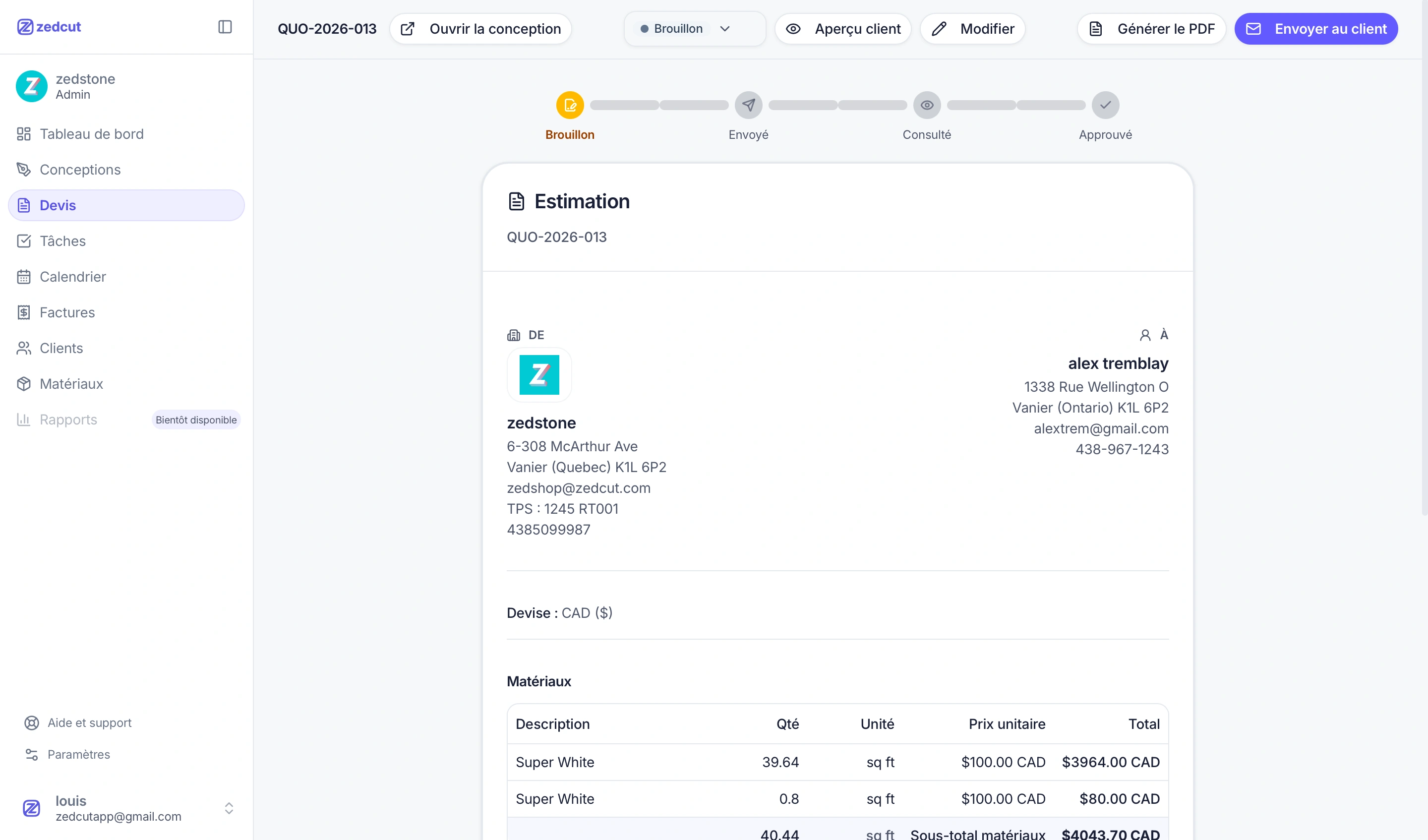
Most fabrication shops don’t lose jobs because they can’t cut stone. They lose time — and sometimes the job — because the countertop quoting software path from measure to client yes is still spreadsheets, emailed PDFs, and “did you see my last version?” threads. This guide covers what quoting software must do for a shop, where Excel breaks, and how draw → price → PDF → approve keeps one record of truth.
What countertop quoting software actually has to do
Quoting is not a pretty PDF. For a countertop shop, software has to carry the job from the site measure into a document the client can understand and act on — without retyping dimensions three times. Solid countertop estimating software should capture piece geometry (L, U, islands, cutouts, edges), price from real catalog materials, add fabrication, delivery, taxes, and optional deposit lines, send a client-ready PDF with a way to accept or refuse, and track whether the quote is draft, sent, viewed, or decided.
If nesting lives in the same job, material quantity is based on a layout you can defend. See how to reduce slab waste with countertop nesting. What you do not need is a portal that forces homeowners to invent a password. Approval should be easy for them and trackable for you.
Where Excel and emailed PDFs break the job
Excel is flexible — that is the problem. Every estimator builds formulas; every revision creates a new file name. The drawing lives in one tool, the material list in another, and the PDF the client opened might not be the one your cutter printed. Common failure points in fabrication shop quoting: retyping dimensions into a price sheet (typos become margin leaks); version chaos (Quote_v3_FINAL next to Quote_v2_client); no status (you know you sent, not if they opened); approval by reply (“Looks good!” hard to attach to a line-item total); invoice rebuild (accepted quote retyped into another template).
Homeowner bid pages and software listicles dominate search, but they rarely describe the shop problem: approval often means signing off on layout and price together, not a vague lump sum. Emailed PDFs alone do not give viewed or accepted states, and they do not lock the design that was quoted.
Draw → price → PDF: one record, no retyping
The practical fix is one job record that moves through drawing, pricing, and documents. In a connected workflow you draw pieces with live edge dimensions and cutouts; nest when you need slab utilization so material lines match what will be cut; price from catalog materials plus fabrication and custom lines; preview what the client will see (line items and design plan); then email a PDF with your logo and a public approve/decline link.
That is the core of modern countertop quoting software: the quote is generated from the same job as the drawing, not assembled later. Material catalog entries feed quote lines. Organization taxes and optional deposit settings travel with the document. Explore estimating and client documents on Zedcut’s features page. When the design is linked to a sent quote, you avoid silent edits that change what the client already reviewed.
Client approval without a client account
Shops ask constantly: can we send a countertop quote and get a real yes without making the client create a login? Yes — when approval is a public link, not a portal. The client opens the quote, sees line items and the design plan with measurements, then approves or declines and types their name. No account. No password reset emails. That friction matters for homeowners and general contractors who need to move the job forward.
On your side, quote statuses should move through draft → sent → viewed → accepted or refused. “Viewed” tells you whether to follow up. “Accepted” triggers convert to invoice without rebuilding lines. This is quote PDF client approve done properly: PDF for their records, link for a tracked decision. Deposit instructions can ride along as a percentage or amount before fabrication.
What to check before you switch tools (checklist)
Before you move fabrication shop quoting off spreadsheets, walk this with your estimator and office lead:
Geometry in, price out — Can quotes start from drawings (and nesting) without retyping sizes?
Catalog-backed materials — Do slab sizes and sale rates feed line items automatically?
Client document quality — Logo, address, design plan, and taxes on the PDF?
No-account approval — Public approve/decline with name capture?
Status timeline — Draft, sent, viewed, accepted/refused visible to the team?
Deposit + invoice path — Optional deposit and convert accepted quote to invoice without re-entry?
Roles — Can cutters see nesting without full pricing if that is your policy?
Language & currency — EN/FR product fit and CAD billing if you operate in Canada?
Trial honesty — Clear trial terms (Zedcut Essential monthly: 14-day trial, card required, CAD)?
Support path: use contact for a walkthrough. Compare seats and modules on pricing so the plan matches how many people touch quotes day to day.
How Zedcut handles quote → approve → invoice
Zedcut is built for countertop fabrication shops that want drawing, nesting, and documents in one workspace. Soft product note — the quoting path as it exists today: draw → nest → quote from the same job, with material lines from placed slabs and your catalog; email the quote with a PDF and a public approve/decline link where the client types their name (no client account); statuses draft → sent → viewed → accepted/refused; optional deposit % (or amount); convert an accepted quote to an invoice without retyping; organization logo on PDFs; product in EN/FR; plans billed in CAD; Essential from $100/mo CAD with a 14-day trial on Essential monthly (card required).
No invented ROI claims. The win is operational: fewer retypes, clearer status, and a client yes attached to the right document. Browse features for drawing, nesting, quoting, and invoices end to end.
FAQ
What is countertop quoting software?
It is software that helps a fabrication shop turn job measurements and materials into a priced document, send it to the client, and track whether it was viewed or accepted. Strong tools keep drawing (and often nesting) attached to the same quote so you are not rebuilding the kitchen in Excel.
Can clients approve a quote without creating an account?
They can when the shop sends a public approve/decline link. The client reviews the details and design plan, then accepts or refuses and types their name. No client portal login is required for that decision.
How is quoting software different from a PDF template?
A template is a static file. Quoting software maintains line items, taxes, deposits, status, and often the linked design. When the client accepts, you can generate an invoice from the same data instead of starting over in another template.
Should quoting and nesting live in the same tool?
For slab shops, yes — nesting is where material quantity becomes real. Pricing from a nested layout reduces “we need another slab” surprises after the quote. More detail: countertop nesting and waste.
How long does it take a small shop to send a professional quote?
It depends on how complete the measure is and whether materials are already in your catalog. Shops that keep drawing and pricing in one job typically spend time on judgment calls — edge details, extras, deposit — not on rebuilding the spreadsheet. The first quotes in a new tool take longer while you set catalog and taxes; routine jobs get faster once that base exists.
If you want to try draw → price → PDF → approve on a real kitchen, start a free trial and send one quote end to end. Questions about fit? Contact Zedcut — or review pricing and features before you switch.