
How to Reduce Slab Waste with Countertop Nesting (Before You Buy)
Countertop nesting shows slab utilization and waste before you purchase material — so fab shops quote accurately and cut less scrap.
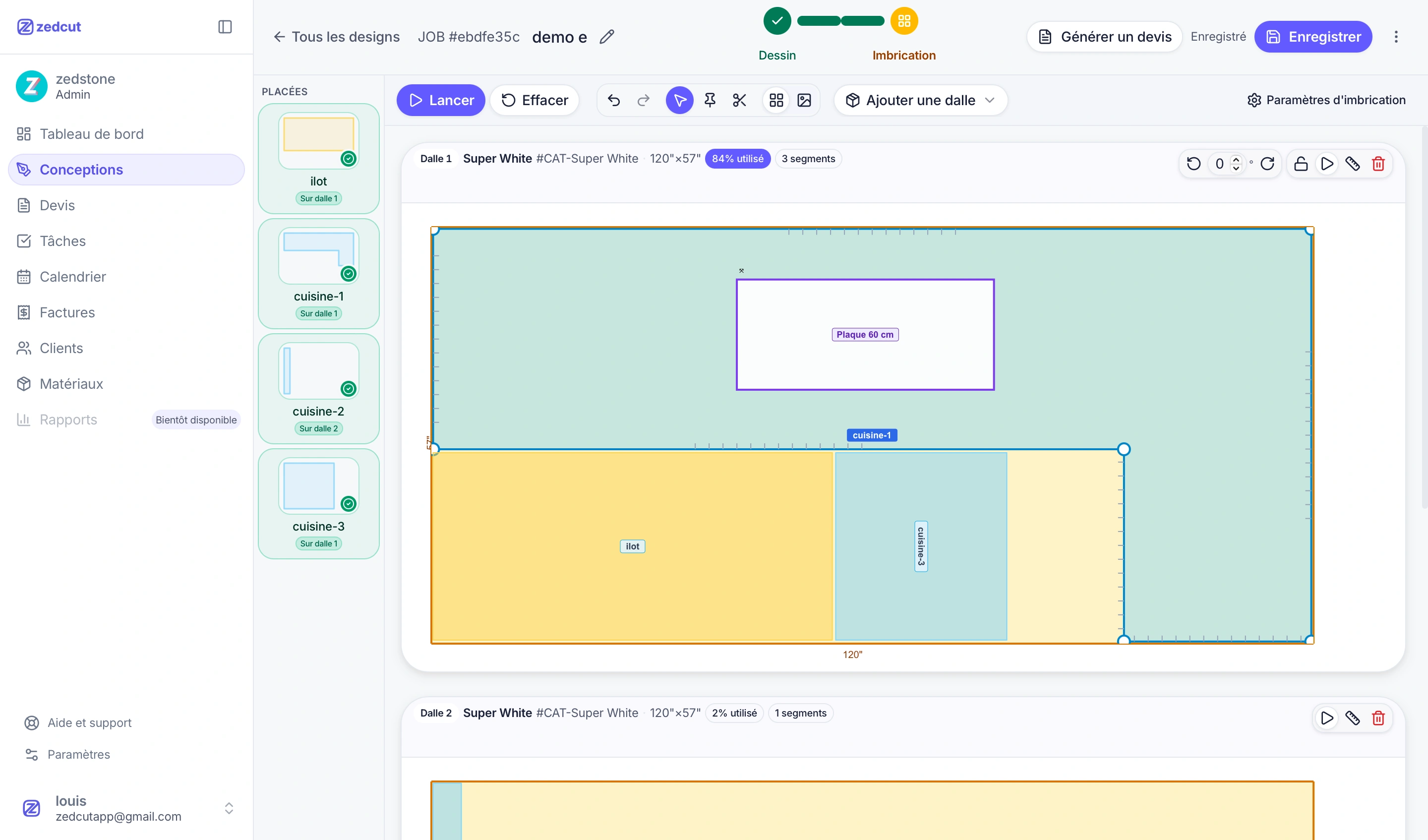
Why slab waste shows up too late in countertop shops
In many fabrication shops, waste appears after the slab is already purchased. You measure on site, draw the pieces, order material, then discover leftover when the cutter lays out the job.
By then the cost is locked into the quote — or absorbed as margin loss.
Countertop slab nesting moves that discovery earlier: you see utilization and scrap before you buy the slab.
What countertop slab nesting actually means
Slab nesting is the process of arranging countertop pieces onto real sheet sizes (length × width × thickness) to maximize material use while respecting grain direction, gaps, and cuts your shop can actually fabricate.
In a connected workflow like Zedcut, nesting sits between drawing and quoting:
Draw pieces — L-shapes, U-shapes, islands, cutouts, and edges
Select slabs from your materials catalog
Run automatic nesting or place pieces manually
Review utilization % and waste
Generate a client quote from the nested layout
That keeps geometry, material, and pricing in one job — instead of rebuilding the same kitchen in Excel.
How nesting reduces material waste before you buy
When you nest before purchasing, you can answer hard questions early:
Will one slab finish this kitchen, or do you need a second?
Does a piece need a split because it exceeds slab size?
Does grain direction force a less efficient layout?
Is the quoted material area close to what nesting actually uses?
When shops quote from averages or rough area estimates, scrap often stays hidden until fabrication. Nesting surfaces utilization and leftover before you buy — so you can still change the plan, the slab choice, or the price.
Split approval: control cuts before the optimizer packs
Large pieces frequently don’t fit as a single segment. Strong nesting workflows don’t silently cut a piece — they propose splits and wait for approval.
That protects fabrication quality while still letting the algorithm tighten packing after you approve. Waste decisions stay with estimators and shop leads, not a black box.
From nested slabs to a more accurate countertop quote
Once pieces are nested:
Material line items reflect placed slabs and catalog pricing
You add fabrication, delivery, or custom lines
Taxes and optional deposit follow your shop settings
You email a PDF plus a public link so the client can approve or decline
Clients aren’t signing a vague spreadsheet estimate. They’re approving a plan tied to real dimensions and material use — so quotes stay clearer and mid-job material surprises are easier to avoid.
Explore how drawing, nesting, and quoting connect on Zedcut’s features page.
Who benefits from nesting software in a fab shop
Estimators — faster quotes with defensible material quantities
Owners / managers — less emergency slab buying and clearer margins
Cutters & installers — clearer piece plans and fewer layout surprises on the floor
Role-based access also matters: office staff can see pricing while field roles focus on drawings and tasks.
How to try nesting on your next kitchen job
Pick one recent or upcoming kitchen (L-shape or U-shape works well)
Draw the pieces with real cutouts and edge types
Nest on your standard sheet sizes
Compare the waste report to what you would have ordered historically
Send the quote from the same nested job
If utilization looks different from what you expected, you caught it before the first cut — while you can still adjust the buy.
Ready to nest before you buy? Start a free trial of Zedcut and run your next countertop job through drawing → nesting → quote in one workspace.